Table of Contents
ToggleIf you’re spending eight hours a day sitting in an uncomfortable office chair, you’re not alone, and you’re likely paying the price with lower back pain, poor posture, and fatigue by day’s end. A memory foam office chair cushion is one of the simplest upgrades a homeowner or DIY enthusiast can make to transform a workspace without replacing the entire chair. Unlike generic seat pads, quality memory foam molds to your body’s contours, distributing weight evenly and reducing pressure points. This guide walks you through why memory foam matters, how to pick the right cushion, install it properly, and keep it in good shape for years of comfortable sitting.
Key Takeaways
- A memory foam office chair cushion distributes weight evenly to improve posture, reduce lower back pain, and eliminate pressure points without replacing your entire chair.
- Choose a cushion with 3–4 PCF density, 2.5–3 inch thickness, a removable washable cover, and a non-slip base to ensure proper support and durability in your home office.
- Proper installation—including cleaning your chair seat, centering the cushion, checking leg alignment, and allowing 24–48 hours for off-gassing—maximizes comfort from day one.
- Regular maintenance like gentle cover washing, spot-cleaning the foam, and proper storage extends your memory foam cushion’s lifespan to 5–7 years.
- Memory foam with temperature-regulating features (gel or copper infusions) prevents heat retention and keeps you comfortable during long 6+ hour work sessions.
Why Memory Foam Cushions Are Game-Changers for Home Office Setups
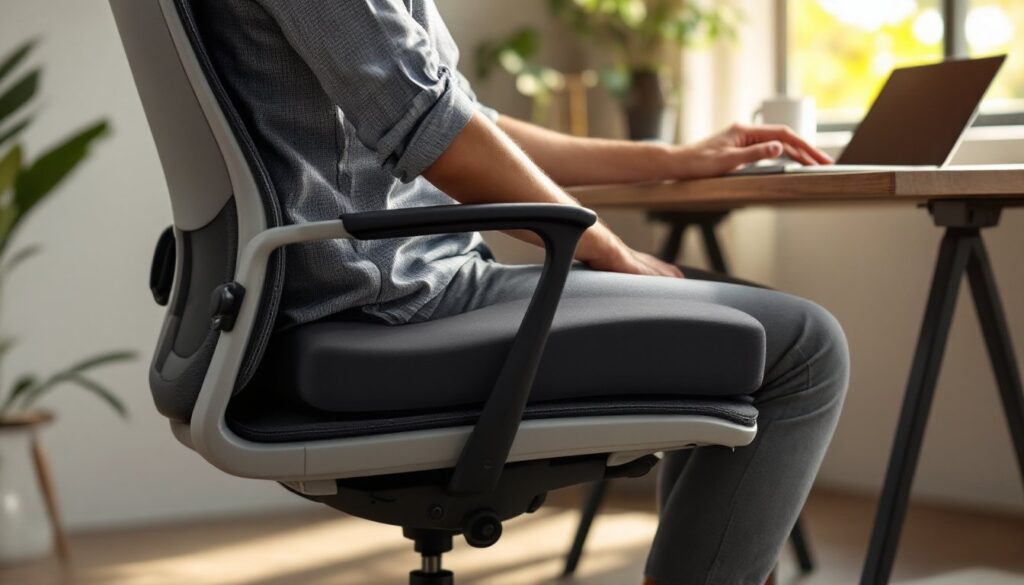
A memory foam office chair cushion does more than just make sitting softer. It’s a targeted fix for the posture and circulation problems that come with hours in a standard chair. Standard office chairs, especially budget models or hand-me-downs, offer minimal support and compress unevenly over time. Memory foam responds to your body’s heat and weight, contouring to your shape and maintaining that support day after day.
The ergonomic payoff is real. When your sit bones and thighs rest on properly distributed support, your spine naturally aligns better, your hip flexors don’t tighten as much, and you avoid that “dead leg” feeling from compressed nerves. For anyone working from home, this translates to fewer stretch breaks, less fidgeting, and genuine comfort that lets you focus on actual work instead of your aching backside.
Memory foam also performs well in different climates. Unlike cheaper polyurethane foam that hardens in cold or gets mushy in heat, quality memory foam, typically viscoelastic polyurethane, maintains consistent support across temperature ranges. This matters if your home office gets chilly in winter or warm in summer.
How Memory Foam Cushions Improve Posture and Reduce Pain
Posture issues often stem from uneven pressure distribution. A flat, worn chair seat forces your weight onto a small area, causing your pelvis to tilt and your lower back to round forward. Memory foam spreads that load across a wider surface, lifting your hips slightly and keeping your pelvis neutral. This small shift is surprisingly powerful: your lower back doesn’t overarch, your shoulder blades don’t hunch forward, and your neck stays stacked over your shoulders.
Pain reduction follows naturally. Sciatic nerve irritation, tailbone pressure, and hip flexor tightness all ease when you’re not sitting on a rock-hard surface. Research on occupational health consistently shows that proper seating support reduces back pain and improves posture metrics. For DIYers and homeowners already dealing with desk work, adding a memory foam cushion often means fewer chiropractic visits and less ibuprofen.
Choosing the Right Memory Foam Cushion for Your Office Chair
Not all memory foam cushions are created equal. Before you click “add to cart,” you need to know what separates a solid investment from something you’ll regret in six months.
First, measure your chair seat. Most office chairs have seat depths between 16 and 18 inches and widths between 16 and 20 inches. A cushion that’s too small won’t cover enough area: one that’s too large will bunch up or overhang, making it awkward to use. Check the product listing for exact dimensions, don’t assume “universal” fits your chair.
Second, consider thickness and density. Thickness usually ranges from 2 to 4 inches: 2.5 to 3 inches strikes a balance between comfort and not sitting so high that your legs dangle. Density (typically measured in pounds per cubic foot or PCF) tells you how firm the foam is. Higher density (4–5 PCF) holds shape longer and supports heavier users: lower density (2–3 PCF) feels plushy but compresses faster. For an office setting, 3–4 PCF is the sweet spot.
Look at the cover material too. A washable, removable cover is non-negotiable. Microsuede, cotton blends, and mesh covers are common: mesh breathes better if your office runs warm, while suede or velour feels more luxurious. The cover should be machine-washable and the foam underneath shouldn’t absorb odors or dust.
Key Features to Look For When Shopping
Temperature regulation: Some memory foam retains heat, making your backside sweat. Look for gels, copper, or phase-change materials infused into the foam, these draw heat away from your body. This is especially important if you’re sitting for 6+ hours at a stretch.
Non-slip base: The bottom of the cushion should have a textured or rubberized base that won’t slide around on your chair seat when you shift position. Sliding cushions are frustrating and unsafe.
Proper support edge: A cushion with memory foam that extends to the edges (rather than compressed edges) stays in place better and feels more finished when you sit down.
Thickness and firmness rating: Check whether the manufacturer rates the cushion as “soft,” “medium,” or “firm.” Soft is plushy but may bottom-out if you weigh over 200 pounds: firm can feel like sitting on a brick if you’re lighter. Medium is the safest default for most home office users.
When shopping on office comfort products, pay attention to user reviews mentioning longevity and how the foam held up after 6 months of daily use. Marketing claims fade: real experiences don’t.
Installation and Setup Tips for Maximum Comfort
Installation is straightforward, but a few steps make a difference.
Step 1: Clean your chair seat. Dust and debris can trap moisture and prevent the cushion from sitting flush. Wipe your chair seat with a damp cloth and let it dry completely before placing the cushion.
Step 2: Position the cushion. Center it on the seat. If your chair has arms that are slightly recessed, the cushion may touch or slightly compress them, that’s okay. If it bunches up on the sides, trim the corners slightly with a serrated knife or hot-wire foam cutter (a cheap alternative is an electric carving knife).
Step 3: Test the height adjustment. Sit down and check your thighs. Your legs should be roughly parallel to the floor, with your feet flat and your knees at a 90-degree angle. If your feet dangle, you may need a footrest or a lower-density cushion. If your knees are above your hips, the cushion is too thick (consider a 2-inch instead of 3-inch).
Step 4: Let it breathe. New memory foam sometimes has a chemical smell (off-gassing). Air out the cushion by leaving your office window or door open for 24–48 hours. This is normal and harmless, just unpleasant.
Step 5: Acclimate. Memory foam performs best after it’s had time to conform to your body. It may feel stiff for the first few hours of use, then soften slightly. Give it a week of regular use before deciding whether it’s right for you.
If you’re using a chair with a waterfall edge (cushion that curves down to meet the base), you can taper the front edge of your memory foam slightly with a utility knife to match that curve. This is optional but creates a more polished look.
Maintenance and Care to Extend Your Cushion’s Lifespan
A well-maintained memory foam cushion lasts 5–7 years, sometimes longer. Neglect it and you’re looking at replacement in 2–3 years.
Cleaning the cover: Remove the cover if it’s detachable and machine-wash it on a gentle cycle with cool water. Avoid bleach and hot water, which degrade the fabric and any foam bits clinging to it. Air-dry completely before reattaching. If the cover is non-removable, spot-clean with a mixture of cool water, mild dish soap, and a soft brush. Let it air-dry fully before use.
Caring for the foam itself: Never submerge the foam in water or machine-wash it directly. Spot-clean with the same soap-and-water mixture and a cloth, then air-dry in a well-ventilated space (away from direct sunlight, which can degrade foam). If your cushion develops odors, sprinkle baking soda on the foam side, let it sit for 4–6 hours, then vacuum it off.
Storage and rotation: If you’re not using your office chair for extended periods, store the cushion in a cool, dry place (not a damp basement where mold can take hold). You don’t need to rotate the cushion like a mattress, but if you notice uneven compression, rotating it 180 degrees every month or two can help.
Preventing premature wear: Avoid eating or drinking heavily while seated on the cushion, spills seep into the foam and create mold risk. Similarly, don’t use it as a resting spot for sharp objects. If you notice small tears in the cover, repair them immediately with a fabric patch kit before moisture gets in.
If the foam feels permanently compressed in one spot or has absorbed liquid, it’s time to replace it. Memory foam doesn’t bounce back from deep damage, and a degraded cushion won’t support your posture properly. On design-focused home offices shown in resources like Homedit’s modern living ideas, a worn cushion looks shabby alongside otherwise polished decor, replacement is worth the investment.
Conclusion
A memory foam office chair cushion is a low-cost, high-impact upgrade that transforms daily comfort without requiring renovation, permits, or professional installation. By measuring carefully, choosing the right density and thickness, installing properly, and maintaining it regularly, you’ll enjoy years of ergonomic support and pain relief. Your home office is where you spend significant time, make it work for your body, not against it.